 8177675465
Summary: This PR adds support for using SonarKit clients in Swift apps. Fixes #13, fixes #87 1. Swift can't import Obj-C modules which have C++ headers. For this reason, we use SonarKit as an Obj-C++ wrapper around Sonar, which is written in C++. Due to search path misconfiguration, trying to import SonarKit into a Swift project would import `xplat/Sonar/SonarPlugin.h` instead of `iOS/SonarKit/SonarPlugin.h`, which caused `file not found` errors for C++ stdlib imports like #28 because new projects don't have their search paths set up correctly. 2. The network and layout plugins have C++ definitions (struct methods, classes) in some of their headers. This causes the compiler to get confused for Swift projects, because it only supports importing Objective-C files in umbrella headers, meaning that the `SonarKit` won't build. 1. I updated the `HEADER_SEARCH_PATHS` of SonarKit.podspec's build configuration to include `${PODS_ROOT}/Headers/Private/SonarKit/**` first, which alleviates the search path issue. The Obj-C `Sample` project seems to have worked around this by including a hardcoded `${PODS_ROOT}/SonarKit/**` search path in the pbxproj, which is why Sample works but new projects (like those referenced in #28) don't. I removed this since it's no longer necessary. 2. I added a `SampleSwift` app to demonstrate using Sonar with a Swift project. 3. Because the Podfiles for `Sample` and `SampleSwift` referenced podspecs using `:podspec` instead of a concrete version, Cocoapods wouldn't copy local header files (instead, it downloads them from the source). To enable local development of these sample apps using `:path`, I added a symlink to SonarKit.podspec in the root of the directory. 4. I changed SonarKit.podspec to use a tag-based `source`, since v0.0.1 pulls from the master branch of this repo. The layout and network plugins still don't work with Swift - in order to fix this, we'll need to work on extracting the C++ out of their headers and writing Obj-C++ wrappers for them. I decided to push this off to a later PR since this one is quite large already. This means that we need to be able to `import SonarKit` without importing all the network/layout plugin headers. In order to make this work, I made "SonarKit/Core" the spec's `default_subspecs`. priteshrnandgaonkar, let me know if you have any thoughts on this implementation. You can verify that the SampleSwift app works by checking out this branch, `pod install`ing in the SampleSwift directory, and building it :) 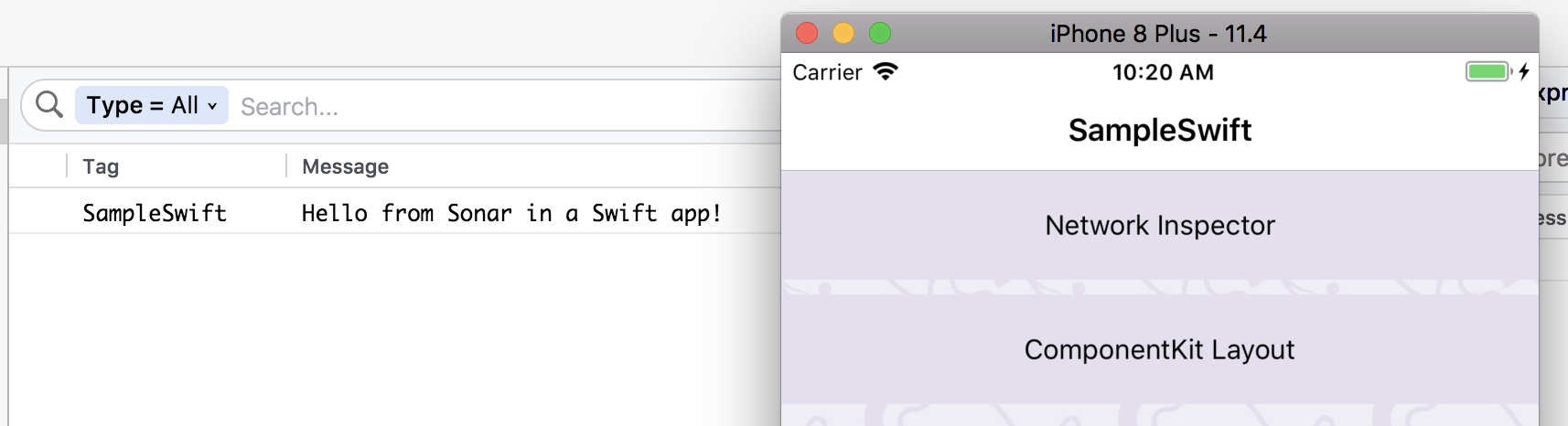 Pull Request resolved: https://github.com/facebook/Sonar/pull/106 Reviewed By: jknoxville Differential Revision: D8890010 Pulled By: priteshrnandgaonkar fbshipit-source-id: 449305bcc5cbeb5787c23f51b1ecb80a5cbdad32

121 lines
4.1 KiB
Markdown
121 lines
4.1 KiB
Markdown
---
|
|
id: getting-started
|
|
title: Getting Started
|
|
sidebar_label: Getting Started
|
|
---
|
|
|
|
Sonar helps you debug Android and iOS apps running in an emulator/simulator or connected physical development devices. Sonar consists of two parts:
|
|
|
|
* The desktop app for macOS
|
|
* The native mobile SDKs for Android and iOS
|
|
|
|
To use Sonar, you need to add the mobile SDK to your app.
|
|
|
|
## Setup
|
|
|
|
### Desktop app
|
|
|
|
The desktop part of Sonar doesn't need any particular setup. Simply [download the latest build](https://www.facebook.com/sonar/public/mac) of our app and launch it. The desktop app is available for macOS and requires a working installation of the Android/iOS development tools on your system.
|
|
|
|
Once you start Sonar and launch an emulator/simulator or connect a device, you will already be able to see the device logs in Sonar. To see app specific data, you need to integrate our native SDKs with your app.
|
|
|
|

|
|
|
|
### Setup your Android app
|
|
|
|
Add the following permissions to your AndroidManifest.xml. The SDK needs these to communicate with the desktop app on localhost via adb. It won't make any external internet requests.
|
|
|
|
```
|
|
<uses-permission android:name="android.permission.INTERNET" />
|
|
<uses-permission android:name="android.permission.ACCESS_WIFI_STATE" />
|
|
```
|
|
|
|
Sonar is distributed via JCenter. Add dependencies to your `build.gradle` file.
|
|
|
|
```
|
|
repositories {
|
|
jcenter()
|
|
}
|
|
|
|
dependencies {
|
|
debugImplementation 'com.facebook.sonar:sonar:0.6.12'
|
|
}
|
|
```
|
|
|
|
Now you can initialize Sonar in your Application's `onCreate`-method like this:
|
|
|
|
```java
|
|
public class MyApplication extends Application {
|
|
|
|
@Override
|
|
public void onCreate() {
|
|
super.onCreate();
|
|
SoLoader.init(this, false);
|
|
|
|
if (BuildConfig.DEBUG && SonarUtils.shouldEnableSonar(this)) {
|
|
final SonarClient client = AndroidSonarClient.getInstance(this);
|
|
client.addPlugin(new MySonarPlugin());
|
|
client.start();
|
|
}
|
|
}
|
|
}
|
|
```
|
|
|
|
### Setup your iOS app
|
|
|
|
To integrate with an iOS app, you can use [CocoaPods](https://cocoapods.org). Add the mobile Sonar SDK and its dependencies to your `Podfile`:
|
|
|
|
```ruby
|
|
project 'MyApp.xcodeproj'
|
|
source 'https://github.com/facebook/Sonar.git'
|
|
source 'https://github.com/CocoaPods/Specs'
|
|
# Uncomment the next line to define a global platform for your project
|
|
swift_version = "4.1"
|
|
sonarkit_version = '0.6.12'
|
|
|
|
target 'MyApp' do
|
|
|
|
pod 'SonarKit', '~>'+sonarkit_version
|
|
post_install do |installer|
|
|
|
|
installer.pods_project.targets.each do |target|
|
|
if ['YogaKit'].include? target.name
|
|
target.build_configurations.each do |config|
|
|
config.build_settings['SWIFT_VERSION'] = swift_version
|
|
end
|
|
end
|
|
end
|
|
end
|
|
end
|
|
```
|
|
|
|
and install the dependencies by running `pod install`. When you open the Xcode workspace file for your app, you now can import and initialize Sonar in your AppDelegate.
|
|
|
|
```objective-c
|
|
#import <SonarKit/SonarClient.h>
|
|
|
|
@implementation AppDelegate
|
|
|
|
- (BOOL)application:(UIApplication *)application didFinishLaunchingWithOptions:(NSDictionary *)launchOptions
|
|
{
|
|
#if DEBUG
|
|
SonarClient *client = [SonarClient sharedClient];
|
|
[client addPlugin:[MySonarPlugin new]];
|
|
[client start];
|
|
#endif
|
|
...
|
|
}
|
|
@end
|
|
```
|
|
<div class='warning'>
|
|
|
|
* We haven't released the dependency to CocoaPods yet, here is the [issue](https://github.com/facebook/Sonar/issues/132) by which you can track.
|
|
* If you do not use CocoaPods as a dependency management tool then currently there is no way to integrate SonarKit other than manually including all the dependencies and building it.
|
|
* For Android, Sonar works with both emulators and physical devices connected through USB. However on iOS, we don't yet support physical devices.
|
|
* The Sonar layout and network plugins aren't supported in Swift projects since they include C++ dependencies. We're working on supporting these plugins for Swift apps. You can join the discussion on the [issues page](https://github.com/facebook/Sonar/issues).
|
|
</div>
|
|
|
|
## Ready for takeoff
|
|
|
|
Finally, you need to add plugins to your Sonar client. See [Network Plugin](network-plugin.md) and [Layout Inspector Plugin](layout-plugin.md) for information on how to add them.
|