 eb98a042b7
Summary: Changes the callout block header to separate the icon from the header of the callout. The "information" callout at https://fbflipper.com/docs/getting-started/ displays the info icon and "RMATION". 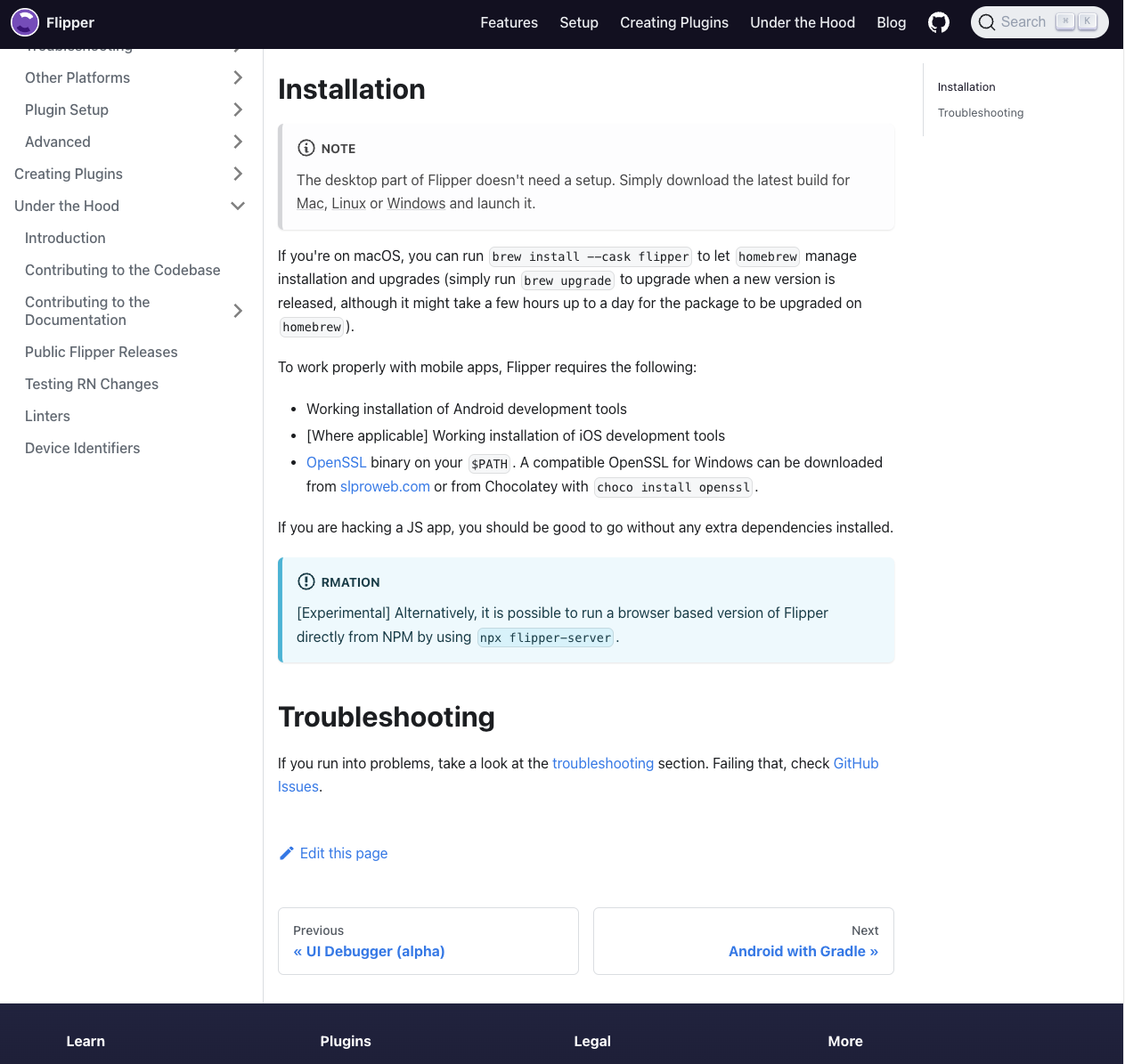 ## Changelog Fixed broken header in a callout block in the getting started docs page Pull Request resolved: https://github.com/facebook/flipper/pull/4044 Test Plan: Build the docs and open `/docs/getting-started/` **Static Docs Preview: flipper** |[Full Site](https://our.intern.facebook.com/intern/staticdocs/eph/D39314921/V4/flipper/)| |**Modified Pages**| |[docs/getting-started](https://our.intern.facebook.com/intern/staticdocs/eph/D39314921/V4/flipper/docs/getting-started/)| Reviewed By: lawrencelomax Differential Revision: D39314921 Pulled By: lblasa fbshipit-source-id: 0d7edc28e5457e0f68e93e871b3518711d35ccc1

60 lines
2.5 KiB
Plaintext
60 lines
2.5 KiB
Plaintext
---
|
|
id: index
|
|
title: Desktop App
|
|
---
|
|
import useBaseUrl from '@docusaurus/useBaseUrl';
|
|
|
|
import FbInstallation from './fb/_installation.mdx';
|
|
|
|
Flipper helps you debug in the following environments:
|
|
|
|
* Android and iOS.
|
|
* Web apps running in an emulator/simulator.
|
|
* Connected physical development devices.
|
|
* Your browser.
|
|
|
|
Flipper consists of two parts:
|
|
|
|
- The desktop app.
|
|
- The native mobile SDKs for Android and iOS, the client for JavaScript, or even a third-party client you could implement yourself or find on the web.
|
|
|
|
Once you start Flipper and launch an emulator/simulator or connect a device, you'll start to see the device logs (and any other device-level plugins that work with your device).
|
|
Currently, there are no plugins available for web apps.
|
|
|
|
To see app-specific data, you need to integrate the Flipper SDK into your app (see the 'Adding Flipper to your app' within the 'Getting Started' section of the SideBar).
|
|
|
|
## Installation
|
|
|
|
<OssOnly>
|
|
|
|
:::note
|
|
The desktop part of Flipper doesn't need a setup. Simply download the latest build for [Mac](https://www.facebook.com/fbflipper/public/mac), [Linux](https://www.facebook.com/fbflipper/public/linux) or [Windows](https://www.facebook.com/fbflipper/public/windows) and launch it.
|
|
:::
|
|
|
|
If you're on macOS, you can run `brew install --cask flipper` to let `homebrew` manage installation and upgrades (simply run `brew upgrade` to upgrade when a new version is released, although it might take a few hours up to a day for the package to be upgraded on `homebrew`).
|
|
|
|
To work properly with mobile apps, Flipper requires the following:
|
|
|
|
* Working installation of Android development tools
|
|
* [Where applicable] Working installation of iOS development tools
|
|
* [OpenSSL](https://www.openssl.org) binary on your `$PATH`. A compatible OpenSSL for Windows can be downloaded from [slproweb.com](https://slproweb.com/products/Win32OpenSSL.html) or from Chocolatey with `choco install openssl`.
|
|
|
|
If you are hacking a JS app, you should be good to go without any extra dependencies installed.
|
|
|
|
:::info Information
|
|
[Experimental] Alternatively, it is possible to run a browser based version of Flipper directly from NPM by using `npx flipper-server`.
|
|
:::
|
|
|
|
</OssOnly>
|
|
|
|
<FbInternalOnly>
|
|
|
|
<FbInstallation />
|
|
|
|
</FbInternalOnly>
|
|
|
|
## Troubleshooting
|
|
|
|
If you run into problems, take a look at the [troubleshooting](troubleshooting/troubleshooting.mdx) section.
|
|
Failing that, check <OssOnly>[GitHub Issues](https://github.com/facebook/flipper/issues).</OssOnly><FbInternalOnly>the [Workplace group](https://fb.workplace.com/groups/230455004101832/).</FbInternalOnly>
|