 dd15cffa64
Summary: Handling issues typically start with: did you look at the Electron logs? Since Flipper is such an extensible tool, running in varying environments I think the console should be support as first class concept. Many errors are currently not shown to the user. This PR is a first attempt to fix that. The implementation is based on https://github.com/samdenty/console-feed, which is used by quite some web based IDE like tools (like codesandbox), and offers a lot of goodies out of the box, like collapsing errors, objects, etc. Edit: also added a counter keeping track of the amount of errors N.B. no need to immediately review this diff, I'll import it to phabricator as soon as I can :) ## Changelog changelog: Introduce 'Debug Logs' section to help users to troubleshoot issues or to provide more accurate reports. Pull Request resolved: https://github.com/facebook/flipper/pull/1479 Test Plan: 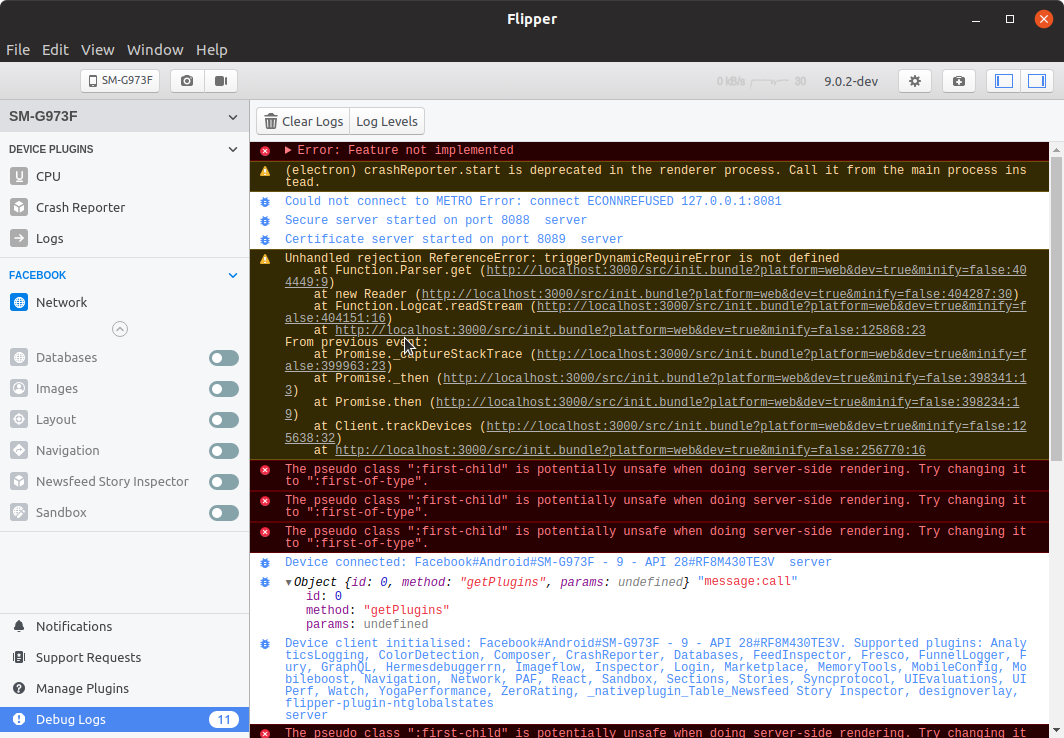 Reviewed By: jknoxville Differential Revision: D23198103 Pulled By: passy fbshipit-source-id: a2505f9fa59e10676a44ffa33312efe83c7be55d

94 lines
2.2 KiB
TypeScript
94 lines
2.2 KiB
TypeScript
/**
|
|
* Copyright (c) Facebook, Inc. and its affiliates.
|
|
*
|
|
* This source code is licensed under the MIT license found in the
|
|
* LICENSE file in the root directory of this source tree.
|
|
*
|
|
* @format
|
|
*/
|
|
|
|
import {useMemo} from 'react';
|
|
import {Button, Toolbar, ButtonGroup, Layout} from '../ui';
|
|
import React from 'react';
|
|
import {Console, Hook} from 'console-feed';
|
|
import type {Methods} from 'console-feed/lib/definitions/Methods';
|
|
import {createState, useValue} from 'flipper-plugin';
|
|
import {useLocalStorage} from '../utils/useLocalStorage';
|
|
|
|
const logsAtom = createState<any[]>([]);
|
|
export const errorCounterAtom = createState(0);
|
|
|
|
export function enableConsoleHook() {
|
|
console.log('enabling hooks');
|
|
Hook(
|
|
window.console,
|
|
(log) => {
|
|
logsAtom.set([...logsAtom.get(), log]);
|
|
if (log.method === 'error' || log.method === 'assert') {
|
|
errorCounterAtom.set(errorCounterAtom.get() + 1);
|
|
}
|
|
},
|
|
false,
|
|
);
|
|
}
|
|
|
|
function clearLogs() {
|
|
logsAtom.set([]);
|
|
errorCounterAtom.set(0);
|
|
}
|
|
|
|
const allLogLevels: Methods[] = [
|
|
'log',
|
|
'debug',
|
|
'info',
|
|
'warn',
|
|
'error',
|
|
'table',
|
|
'clear',
|
|
'time',
|
|
'timeEnd',
|
|
'count',
|
|
'assert',
|
|
];
|
|
|
|
const defaultLogLevels: Methods[] = ['warn', 'error', 'table', 'assert'];
|
|
|
|
export function ConsoleLogs() {
|
|
const logs = useValue(logsAtom);
|
|
const [logLevels, setLogLevels] = useLocalStorage<Methods[]>(
|
|
'console-logs-loglevels',
|
|
defaultLogLevels,
|
|
);
|
|
|
|
const dropdown = useMemo(() => {
|
|
return allLogLevels.map(
|
|
(l): Electron.MenuItemConstructorOptions => ({
|
|
label: l,
|
|
checked: logLevels.includes(l),
|
|
type: 'checkbox',
|
|
click() {
|
|
setLogLevels((state) =>
|
|
state.includes(l)
|
|
? state.filter((level) => level !== l)
|
|
: [l, ...state],
|
|
);
|
|
},
|
|
}),
|
|
);
|
|
}, [logLevels, setLogLevels]);
|
|
|
|
return (
|
|
<Layout.Top scrollable>
|
|
<Toolbar>
|
|
<ButtonGroup>
|
|
<Button onClick={clearLogs} icon="trash">
|
|
Clear Logs
|
|
</Button>
|
|
<Button dropdown={dropdown}>Log Levels</Button>
|
|
</ButtonGroup>
|
|
</Toolbar>
|
|
<Console logs={logs} filter={logLevels} variant="light" />
|
|
</Layout.Top>
|
|
);
|
|
}
|