 3eb53f5987
Summary: When creating a brand new Flipper desktop plugin, the tests don't pass ### To Reproduce ``` npx flipper-pkg init cd flipper-plugin-new yarn jest ``` The test are not passing. It would seem that we have 2 issues since this commit:e46fcba0b2 (diff-26467a831e67f87a2bd99be5b62a71a6e3e4e7f86135c11ccede9a02e58c44feR48)#### 1. `electronRequire` is not defined 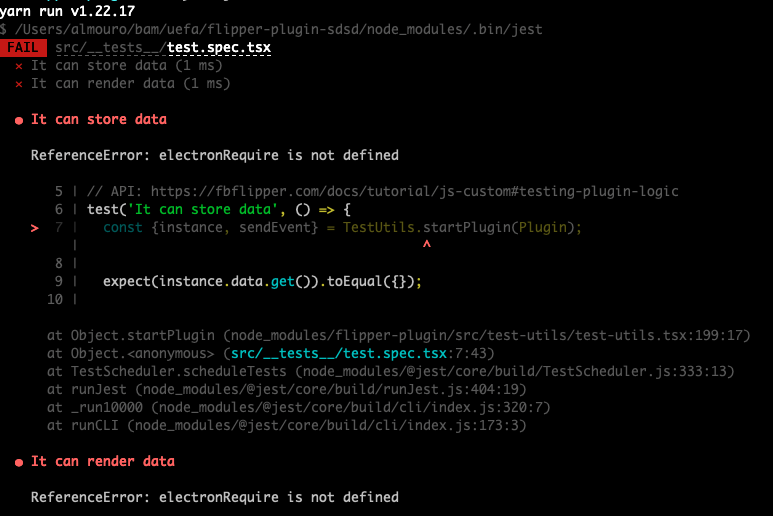 Adding: ```ts // ts-ignore global.electronRequire = require; ``` fixes the issue of course like [here](e46fcba0b2 (diff-a283d77d8667b28aec5319fe5671a91489485a683898efedf9441b816c84a447R15)) but might not be very ideal When fixing this, we hit a second issue: #### 2. Hooks cannot be defined inside tests 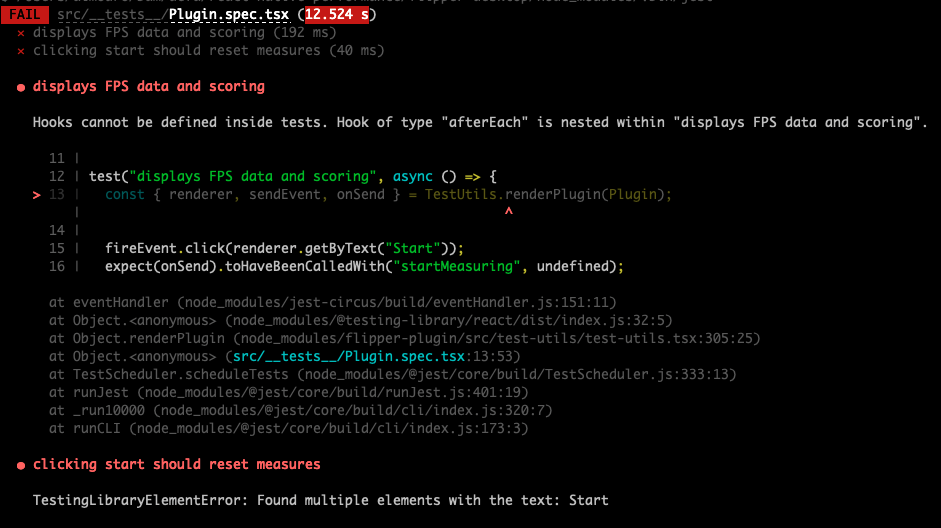 This is because we now require `testing-library/react` on the fly:e46fcba0b2 (diff-26467a831e67f87a2bd99be5b62a71a6e3e4e7f86135c11ccede9a02e58c44feR198)which will run `afterEach` if defined:071a6fdc1d/src/index.js (L12)A non ideal fix is to require `require("testing-library/react");` before running the test ## Changelog Fix: ensure desktop plugin template tests run Pull Request resolved: https://github.com/facebook/flipper/pull/3327 Test Plan: I've cloned the repo and run: ``` cd flipper/desktop/pkg yarn cd ../../.. ./flipper/desktop/pkg/bin/run init ``` I run the tests on the newly package created and they're now good 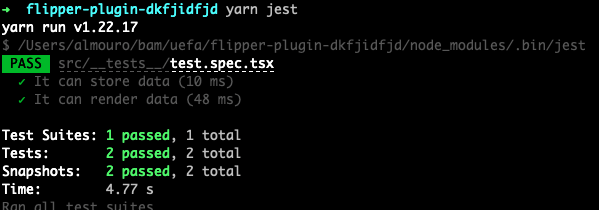 ## Side note The fixes are not great, if you guys have better ones to suggest, really addressing the root cause of the issue, I'll happily close the PR Also it's so easy to test desktop plugins with the awesome work you've done �, it'd be sad if the community could not totally benefit from it. Since I had this issue before (https://github.com/facebook/flipper/pull/3039), I'd be really happy to help (if given some directions 🙏) set up a test to ensure a plugin generated is always well set up. Reviewed By: passy Differential Revision: D33713611 Pulled By: aigoncharov fbshipit-source-id: 43834b30f24c2549d80923d2194487b9f9e6a1ae



flipper-pkg
flipper-pkg is a tool for bundling and publishing Flipper plugins.
Usage
$ npm install -g flipper-pkg
$ flipper-pkg COMMAND
running command...
$ flipper-pkg (-v|--version|version)
flipper-pkg/0.48.0 darwin-x64 node-v12.15.0
$ flipper-pkg --help [COMMAND]
USAGE
  $ flipper-pkg COMMAND
...
Commands
flipper-pkg bundle [DIRECTORY]flipper-pkg checksum [DIRECTORY]flipper-pkg help [COMMAND]flipper-pkg init [DIRECTORY]flipper-pkg lint [DIRECTORY]flipper-pkg migrate [DIRECTORY]flipper-pkg pack [DIRECTORY]
flipper-pkg bundle [DIRECTORY]
transpiles and bundles plugin
USAGE
  $ flipper-pkg bundle [DIRECTORY]

ARGUMENTS
  DIRECTORY  [default: .] Path to plugin package directory for bundling. Defaults to the current working directory.

OPTIONS
  --production  Force env.NODE_ENV=production, enable minification and disable producing source maps.
  --watch       Watch for plugin source code and bundle it after every change.

EXAMPLE
  $ flipper-pkg bundle path/to/plugin
See code: src/commands/bundle.ts
flipper-pkg checksum [DIRECTORY]
computes the total checksum of all the package files
USAGE
  $ flipper-pkg checksum [DIRECTORY]

ARGUMENTS
  DIRECTORY  [default: .] Path to plugin package directory. Defaults to the current working directory.

EXAMPLE
  $ flipper-pkg checksum path/to/plugin
See code: src/commands/checksum.ts
flipper-pkg help [COMMAND]
display help for flipper-pkg
USAGE
  $ flipper-pkg help [COMMAND]

ARGUMENTS
  COMMAND  command to show help for

OPTIONS
  --all  see all commands in CLI
See code: @oclif/plugin-help
flipper-pkg init [DIRECTORY]
initializes a Flipper desktop plugin template in the provided directory
USAGE
  $ flipper-pkg init [DIRECTORY]

ARGUMENTS
  DIRECTORY  [default: .] Path to the directory where the plugin package template should be initialized. Defaults to the
             current working directory.

EXAMPLE
  $ flipper-pkg init path/to/plugin
See code: src/commands/init.ts
flipper-pkg lint [DIRECTORY]
validates a plugin package directory
USAGE
  $ flipper-pkg lint [DIRECTORY]

ARGUMENTS
  DIRECTORY  [default: .] Path to plugin package directory for linting. Defaults to the current working directory.

EXAMPLE
  $ flipper-pkg lint path/to/plugin
See code: src/commands/lint.ts
flipper-pkg migrate [DIRECTORY]
migrates a Flipper desktop plugin to the latest version of specification
USAGE
  $ flipper-pkg migrate [DIRECTORY]

ARGUMENTS
  DIRECTORY  [default: .] Path to the plugin directory. Defaults to the current working directory.

OPTIONS
  --no-dependencies  Do not add or change package dependencies during migration.
  --no-scripts       Do not add or change package scripts during migration.

EXAMPLE
  $ flipper-pkg migrate path/to/plugin
See code: src/commands/migrate.ts
flipper-pkg pack [DIRECTORY]
packs a plugin folder into a distributable archive
USAGE
  $ flipper-pkg pack [DIRECTORY]

ARGUMENTS
  DIRECTORY  [default: .] Path to plugin package directory to pack. Defaults to the current working directory.

OPTIONS
  -o, --output=output  [default: .] Where to output the package, file or directory. Defaults to the current working
                       directory.

  --production         Force env.NODE_ENV=production, enable minification and disable producing source maps.

EXAMPLE
  $ flipper-pkg pack path/to/plugin
See code: src/commands/pack.ts