Summary:
Having a key shortcut to execute the query you're typing helps to speed up the edit-run cycle.
## Changelog
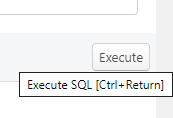
In the database SQL execution tab, you can now execute queries with Ctrl+Return instead of pressing the 'Execute' button.
Pull Request resolved: https://github.com/facebook/flipper/pull/761
Test Plan:
I typed a query into the textarea, and while it was focussed, press Ctrl+Return, and the query executed.
Mousing over the 'Execute' button displays a tooltip informing you of this keyboard shortcut.
Reviewed By: mweststrate
Differential Revision: D19578527
Pulled By: passy
fbshipit-source-id: be131e44e293caa578d48e324fc43b457edb1e4e
 ac8bd8638a
